
What It Does
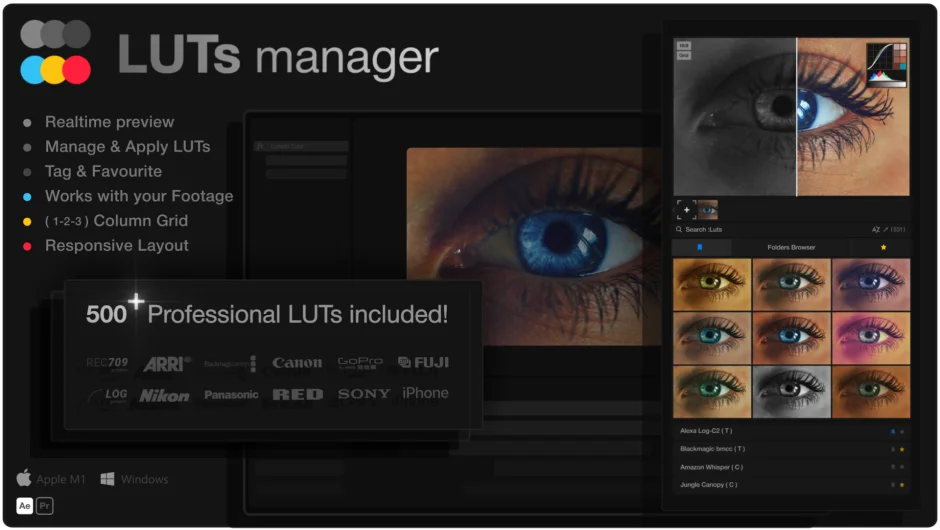
LUTs Manager is a CEP extension for Premiere Pro and After Effects that lets you browse, preview, and apply LUTs without leaving your editing session. Instead of applying each LUT one at a time and waiting for a render, you get a gallery grid showing your footage with multiple LUTs applied simultaneously, updated in real time.
The purchase also includes LUTs Pro, a pack of 500+ professional .cube LUTs organized into 85 color filter categories.
Key Features
Gallery Grid preview. See your footage with dozens of LUTs applied at once in a resizable grid. No rendering required. You can capture a frame from your Premiere Pro timeline or import a still image as the preview source.
Smart Search and tag filtering. Search across LUT names, categories, and custom tags simultaneously. Folder tags are generated automatically, and you can add your own tags to individual LUTs for faster retrieval.
Favorites system. Mark LUTs as favorites and filter to them instantly, within any folder or across your entire library.
Sorting options. Sort by most recently used or alphabetically, so frequently applied looks stay within reach.
Watch Folder support. Point LUTs Manager at any folder on your system and it picks up new LUTs automatically.
Comparison Slider. Toggle a before/after view directly in the panel to judge a look against the ungraded image.
One-click apply. Apply a selected LUT directly to your Premiere Pro clip from the panel via the context menu, with a copy path option for manual workflows.
Responsive panel design. The panel resizes to fit narrow or wide layouts, so it works whether you dock it as a thin sidebar or a full panel.
Who It’s For
Colorists and editors who have accumulated large LUT libraries will get the most out of this. Searching through hundreds of .cube files blind in the Lumetri panel is slow work. LUTs Manager is particularly useful when comparing film emulation looks, matching a client reference, or building a shortlist of options to present for approval.
The included LUTs Pro pack is a reasonable starting point for editors who don’t yet have an established LUT collection. The 500 files span 85 categories with 5 variations per style, all in Rec. 709, with attention to skin tone preservation.
Compatible with Premiere Pro 2022 through 2025, and After Effects 2022 through 2025, on both Windows and Mac (including Apple Silicon, though the developer recommends downloading the trial first on Apple Silicon machines to confirm compatibility).
Pricing
LUTs Manager is a one-time purchase at $79.99, which includes the extension and the LUTs Pro pack. A free trial is available from aescripts.com.