
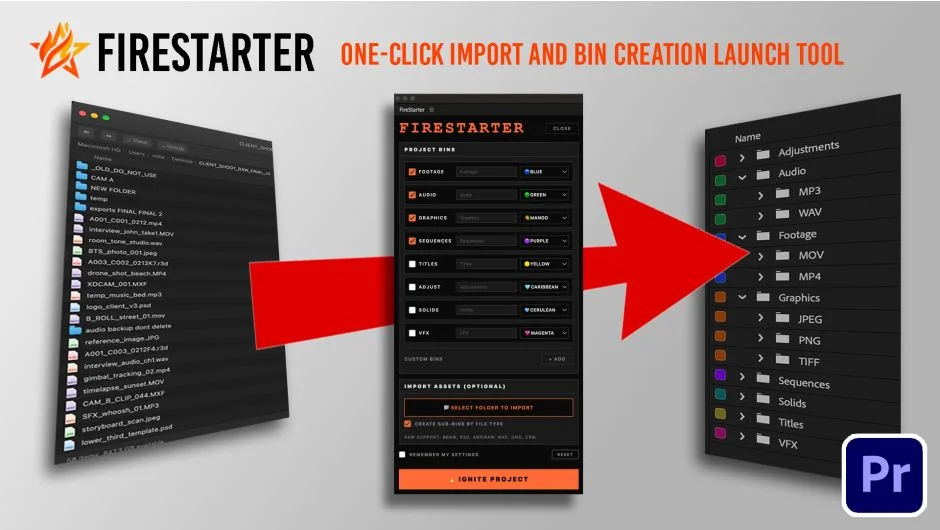
What It Does
FireStarter handles the repetitive part of starting a new Premiere Pro project: getting your files into organized bins. Point it at a folder, hit import, and it creates color-coded bins sorted by file type, video in one place, audio in another, graphics separated out. It supports 40 file types and remembers your bin names, colors, and settings between sessions.
For editors who work with RAW camera formats, FireStarter natively detects BRAW (Blackmagic RAW), R3D (RED RAW), and ARRIRAW files, sorting them alongside other video assets rather than leaving them unrecognized.
Key Features
One-click import. Select a folder, press import. FireStarter handles the rest, no manual drag-and-drop or bin creation required.
Auto-sort by type. Video, audio, and image files each land in their own bin automatically. You can add subbins for more granular organization.
Color-coded bins. Each bin gets a Premiere label color applied. Colors are customizable per bin and saved with your settings.
Duplicate detection. Files already present in the project are skipped, so re-running the importer on a folder won’t clutter your project with duplicates.
Settings persistence. Bin names, colors, and the last folder location are remembered across sessions, so repeat projects with consistent folder structures require minimal setup.
Who It’s For
FireStarter is most useful for editors who follow a consistent folder structure across projects, documentary editors, freelancers handling client rushes, or anyone who finds themselves manually building the same bin structure repeatedly. It’s also a practical time-saver on shoots using Blackmagic, RED, or ARRI cameras, where RAW file recognition can otherwise require extra steps.
Pricing
FireStarter is a one-time purchase at $19.99 (currently discounted to $15.99 until April 18, 2026). A free trial is available via aescripts.com. No subscription required. Compatible with Premiere Pro 2023 through 2026.