
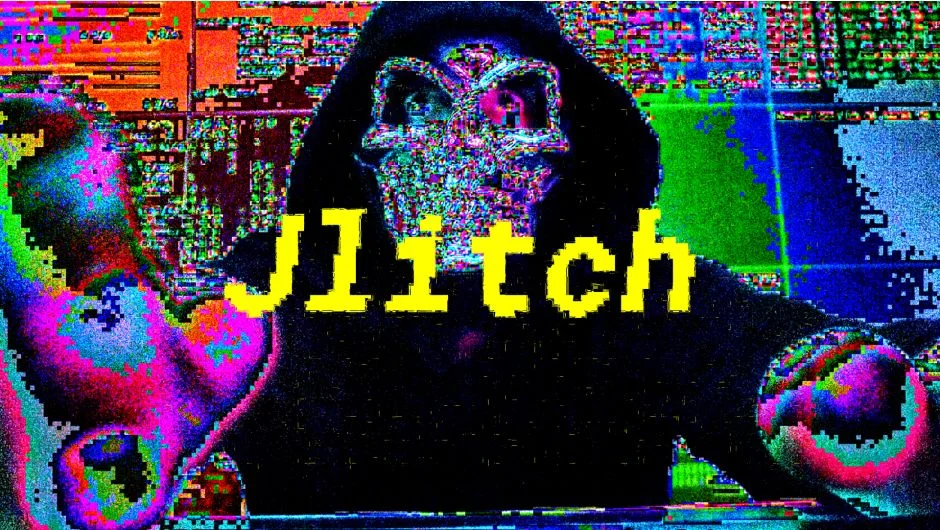
What It Does
Jlitch simulates the kind of visual artifacts you get from codec compression errors and accumulation feedback. Apply it to footage and you get glitch effects that range from subtle digital decay to full psychedelic distortion. It works natively inside Premiere Pro (and After Effects), so there’s no round-tripping through external apps.
The appeal is realism. Rather than just layering pre-made glitch overlays, Jlitch generates effects that mimic how compression actually breaks down, which tends to read as more convincing in motion.
Key Features
Compression error simulation. The core effect models JPEG-style compression artifacts and feedback accumulation, giving you glitch results that look like genuine codec failure rather than a filter.
Range from subtle to extreme. Parameters let you dial in light digital noise or crank things toward full visual chaos. Useful for music videos, title sequences, horror or sci-fi aesthetics, and experimental content.
Preset support. Comes with presets to get started quickly, which is helpful if you want a specific style without building from scratch.
Native Premiere Pro and After Effects support. Compatible with versions 2021 through 2026 on both Windows and Mac (Intel and Apple Silicon, macOS 12.0+).
Who It’s For
Motion designers and video editors working on content that calls for a digital corruption aesthetic. Common use cases include music video intros, horror or thriller title cards, cyberpunk-style graphics, and social media content where glitch visuals are part of the brand language. It pairs naturally with other Pixel Sorter Studio tools like Pixel Sorter 3 or Datamosh 2 if you want a full glitch toolkit.
Pricing
Jlitch is a one-time purchase at $29.99 for a single user license. Floating server and render-only licenses are also available. It’s included in the Glitch Bundle alongside Data Glitch 2, Pixel Sorter 3, Datamosh 2, and Glitch Control for $159.99, which saves 25% compared to buying each separately.