
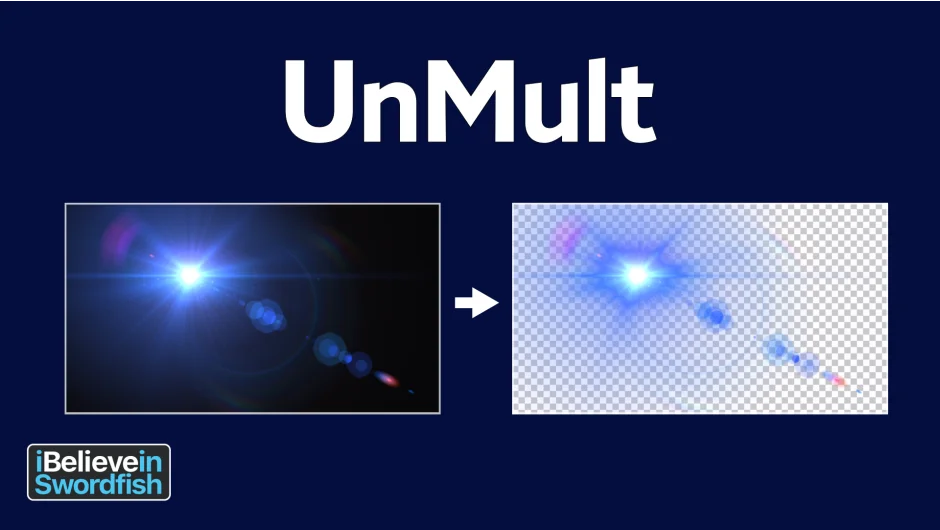
What It Does
UnMult solves a specific compositing problem: when you have a lighting effect (like a lens flare) rendered on a black solid, you can’t just drop it over footage using Normal blend mode. UnMult converts that black background into transparency by un-premultiplying the RGB channels to reach full saturation, then attenuating the alpha by the same amount. The result is a semi-transparent alpha channel that lets the lighting effect sit naturally over your footage without any black fringing.
It works in Premiere Pro, After Effects, and Media Encoder, covering versions 2021 through 2025.
Key Features
Alpha generation from black. Apply it to any lighting effect on a black solid and it generates a usable alpha channel, so you can composite with Normal transfer mode instead of relying on Add or Screen.
Non-destructive appearance. After applying UnMult, the effect looks visually unchanged, but the underlying pixel values are modified to carry proper transparency information.
Who It’s For
Motion graphics artists and compositors who work with lens flares, light leaks, or any glow effects rendered on black. It removes the need to set blend modes as a workaround, giving you cleaner composites and more control over opacity and layering.
Pricing
Fully free, no tiers or subscription required. Download and install via the aescripts manager.