
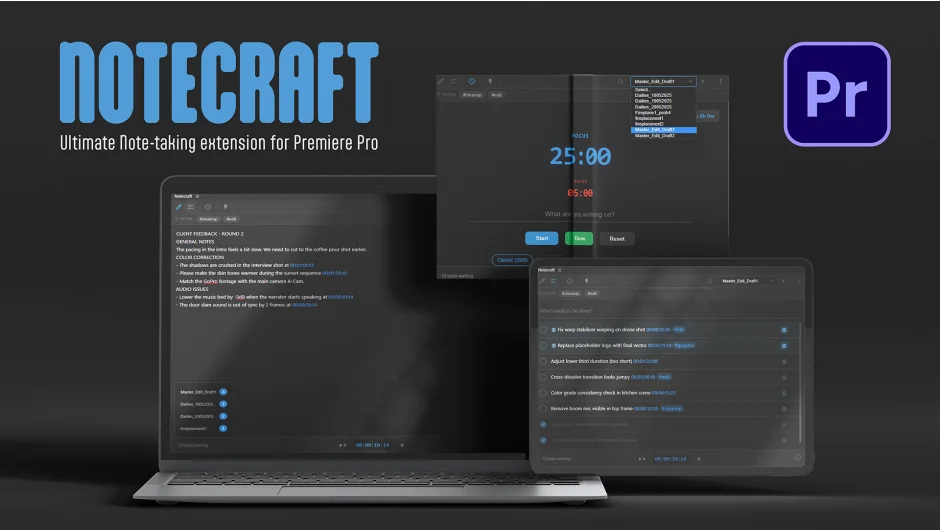
What It Does
Notecraft is a note-taking and task management panel that lives inside Premiere Pro. Instead of jumping between your NLE and a separate notes app, you write revision notes, build to-do lists, and track timecodes without leaving your edit. Notes are stored in a .json file alongside your .prproj, so they travel with the project when you move or share it.
Key Features
Smart Editor. A rich text editor scoped to each sequence. Press @ anywhere in a note to stamp the current playhead position as a clickable timecode. Clicking any timecode in your notes jumps the timeline directly to that frame. Notes save automatically, so nothing is lost if Premiere crashes or you close without thinking.
Power To-Do List. Every sequence gets its own task list. You can type tasks one at a time or paste multi-line text to generate a batch of tasks at once. Tasks marked with a global flag appear across all sequences in the project, useful for notes that apply to the whole edit rather than a specific cut. A right-click context menu lets you duplicate tasks to other sequences.
Marker Sync. One click exports your active notes and tasks directly to Premiere Pro timeline markers. Useful for sharing feedback context with collaborators who don’t have Notecraft installed.
Focus Timer. A built-in Pomodoro timer runs 25-minute focus blocks followed by 5-minute breaks, with visual color coding to distinguish modes. Completed sessions are logged in a history view, and audio alerts fire when a cycle ends.
Who It’s For
Editors who manage client revision rounds will find the per-sequence task lists and timecode stamping particularly useful. Freelancers working alone can use the Pomodoro timer to pace long edit sessions. The project-based file storage makes it a reasonable fit for team environments where project folders are shared, since notes move with the project rather than living in a cloud account.
Pricing
Notecraft is a one-time purchase at $9.99. A free trial is available. Compatible with Premiere Pro 2022 (v22.0) and higher on macOS and Windows.