
What It Does
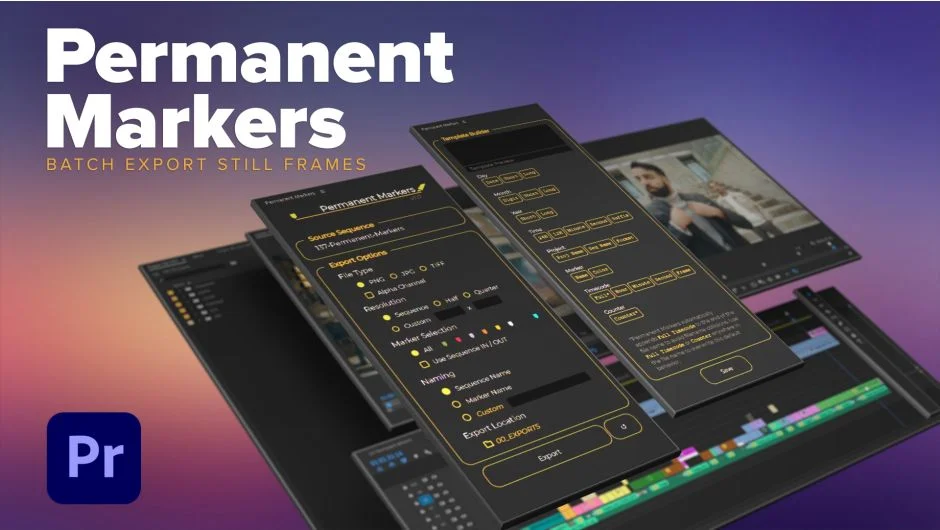
Permanent Markers reads every marker in your Premiere Pro sequence and exports a still image frame at each location in one batch operation. Instead of manually scrubbing to each marker and exporting one frame at a time, you place your markers, set your options, and let the extension handle the rest.
Key Features
Marker color filtering. You can choose to export only stills at markers of a specific color, or multiple colors at once. Combined with the option to limit exports to the sequence IN/OUT range, this gives you precise control over which frames get exported.
File format options with alpha support. Output to JPEG, PNG, or TIFF. PNG and TIFF support alpha channels, making this useful for compositing work or delivering frames that need transparency.
Resolution presets. Export at full sequence resolution, half, quarter, or a custom size. Handy when you need web-sized thumbnails rather than full-res exports.
Custom naming template builder. File names can be based on marker names, the sequence name, or a combination built with the naming template builder. This keeps exported files organized without manual renaming afterward.
Who It’s For
Editors who need to pull reference frames, thumbnail selects, or approval stills at specific edit points will get the most use here. It also works well for anyone delivering frame grabs to a client or creative team, where consistent naming and filtering by marker color can map to a review or approval system.
Pricing
Permanent Markers uses a pay-what-you-want model. Individual users can name their own price, with a suggested amount. Teams and businesses are expected to pay the suggested price for a valid license. It is a one-time purchase with no subscription.