
What It Does
Backup It! lets you save snapshots of any Premiere Pro sequence as a complete project file. Each backup preserves effects, nested sequences, and all linked footage paths, so you can restore a previous state or pull a sequence into a different project without hunting through your drive.
Key Features
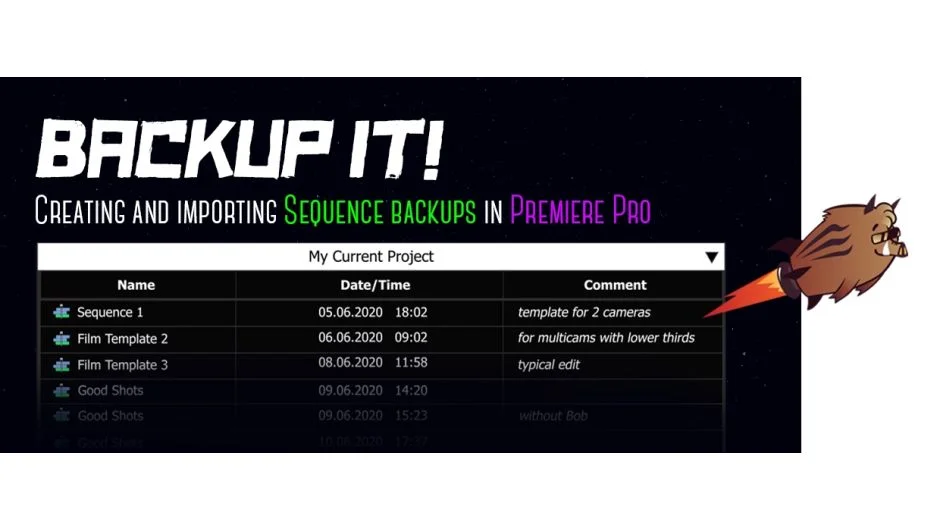
One-click sequence backup. Select any sequence in your project panel or back up the active sequence instantly. The backup list shows the date and time each copy was created, so you always know which version is which.
Custom comments. Add a note to each backup describing why you saved it, useful for tracking client revisions or significant edit decisions.
Import backups across projects. Bring a saved sequence into any project without opening the original. All nesting and footage references come along with it. One caveat: source files must stay in their original locations on disk, since the extension saves the path to the source folder.
Template creation. Back up a sequence loaded with your preferred effects, items, and structure to use as a starting point for future projects.
Sortable backup list. Click column headers to sort backups by name, date, or comment.
Flexible date/time format. Choose how timestamps display in the backup panel.
Who It’s For
Editors who work on long-form projects or handle frequent client revisions will get the most out of this. It also suits anyone who builds reusable sequence templates and wants them close at hand rather than buried in old project files.
Pricing
Backup It! is a one-time purchase at $24.90, available from aescripts.com. A free trial is available before buying.